Class for gathering statistics on the CPU. More...
Public Member Functions | |
| SwStatsCpu (const GlobalConfiguration &configuration) | |
| Construct a SwStatsCpu object. | |
| bool | isValid () const |
| Gets whether the statistics object is valid. | |
| const SharedFD & | getStatsFD () |
| Get the file descriptor for the statistics. | |
| const Size & | patternSize () |
| Get the pattern size. | |
| int | configure (const StreamConfiguration &inputCfg) |
| Configure the statistics object for the passed in input format. | |
| void | setWindow (const Rectangle &window) |
| Specify window coordinates over which to gather statistics. | |
| void | startFrame (uint32_t frame) |
| Reset state to start statistics gathering for a new frame. | |
| void | finishFrame (uint32_t frame, uint32_t bufferId) |
| Finish statistics calculation for the current frame. | |
| void | processFrame (uint32_t frame, uint32_t bufferId, FrameBuffer *input) |
| Calculate statistics for a frame in one go. | |
| void | processLine0 (uint32_t frame, unsigned int y, const uint8_t *src[]) |
| Process line 0. | |
| void | processLine2 (uint32_t frame, unsigned int y, const uint8_t *src[]) |
| Process line 2 and 3. | |
Public Attributes | |
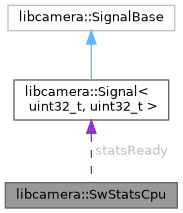
| Signal< uint32_t, uint32_t > | statsReady |
| Signals that the statistics are ready. | |
Static Public Attributes | |
| static constexpr uint32_t | kStatPerNumFrames = 4 |
| Run stats once every kStatPerNumFrames frames. | |
Detailed Description
Class for gathering statistics on the CPU.
CPU based software ISP statistics implementation.
This class offers a configure function + functions to gather statistics on a line by line basis. This allows CPU based software debayering to interleave debayering and statistics gathering on a line by line basis while the input data is still hot in the cache.
It is also possible to specify a window over which to gather statistics instead of processing the whole frame.
Constructor & Destructor Documentation
◆ SwStatsCpu()
| libcamera::SwStatsCpu::SwStatsCpu | ( | const GlobalConfiguration & | configuration | ) |
Construct a SwStatsCpu object.
- Parameters
-
[in] configuration Global configuration reference
Creates a SwStatsCpu object and initialises shared memory for statistics exchange.
Member Function Documentation
◆ configure()
| int libcamera::SwStatsCpu::configure | ( | const StreamConfiguration & | inputCfg | ) |
Configure the statistics object for the passed in input format.
- Parameters
-
[in] inputCfg The input format
- Returns
- 0 on success, a negative errno value on failure
◆ finishFrame()
| void libcamera::SwStatsCpu::finishFrame | ( | uint32_t | frame, |
| uint32_t | bufferId | ||
| ) |
Finish statistics calculation for the current frame.
- Parameters
-
[in] frame The frame number [in] bufferId ID of the statistics buffer
This may only be called after a successful setWindow() call.
◆ getStatsFD()
|
inline |
Get the file descriptor for the statistics.
- Returns
- The file descriptor
◆ isValid()
|
inline |
Gets whether the statistics object is valid.
- Returns
- True if it's valid, false otherwise
◆ patternSize()
|
inline |
Get the pattern size.
For some input-formats, e.g. Bayer data, processing is done multiple lines and/or columns at a time. Get width and height at which the (bayer) pattern repeats. Window values are rounded down to a multiple of this and the height also indicates if processLine2() should be called or not. This may only be called after a successful configure() call.
Valid sizes are: 1x1, 2x2, 4x2 or 4x4.
- Returns
- The pattern size
◆ processFrame()
| void libcamera::SwStatsCpu::processFrame | ( | uint32_t | frame, |
| uint32_t | bufferId, | ||
| FrameBuffer * | input | ||
| ) |
Calculate statistics for a frame in one go.
- Parameters
-
[in] frame The frame number [in] bufferId ID of the statistics buffer [in] input The frame to process
This may only be called after a successful setWindow() call.
◆ processLine0()
|
inline |
Process line 0.
- Parameters
-
[in] frame The frame number [in] y The y coordinate. [in] src The input data.
This function processes line 0 for input formats with patternSize height == 1. It'll process line 0 and 1 for input formats with patternSize height >= 2. This function may only be called after a successful setWindow() call.
This function takes an array of src pointers each pointing to a line in the source image.
Bayer input data requires (patternSize_.height + 1) src pointers, with the middle element of the array pointing to the actual line being processed. Earlier element(s) will point to the previous line(s) and later element(s) to the next line(s). See the DebayerCpu::debayerFn documentation for details.
Planar input data requires a src pointer for each plane, with src[0] pointing to the line in plane 0, etc.
For non Bayer single plane input data only a single src pointer is required.
◆ processLine2()
|
inline |
Process line 2 and 3.
- Parameters
-
[in] frame The frame number [in] y The y coordinate. [in] src The input data.
This function processes line 2 and 3 for input formats with patternSize height == 4. This function may only be called after a successful setWindow() call.
◆ setWindow()
| void libcamera::SwStatsCpu::setWindow | ( | const Rectangle & | window | ) |
Specify window coordinates over which to gather statistics.
- Parameters
-
[in] window The window object.
This method specifies the image area over which to gather the statistics. It must be called to set the area, otherwise the default zero-sized Rectangle is used and no statistics is gathered.
The specified window is relative to what is passed to the processLine* methods. For example, if statistics are to be gathered from the entire processed area, then window should be a rectangle with the top-left corner of (0,0) and the same size as the processed area. If only a part of the processed area (e.g. its centre) is to be considered for statistics, then window should specify such a restriction accordingly.
It is the responsibility of the callers to provide sensible window values, most notably not exceeding the original image boundaries. This means, among other, that neither coordinate of the top-left corner shall be negative.
Due to limitations of the implementation, the method may adjust the window slightly if it is not aligned according to the bayer pattern determined in SwStatsCpu::configure(). In that case the window will be modified such that the sides are no larger than the original, and that the new bottom-left corner will be no further from (0,0) (along either axis) than the original was.
◆ startFrame()
| void libcamera::SwStatsCpu::startFrame | ( | uint32_t | frame | ) |
Reset state to start statistics gathering for a new frame.
- Parameters
-
[in] frame The frame number
This may only be called after a successful setWindow() call.
The documentation for this class was generated from the following files:
- include/libcamera/internal/software_isp/swstats_cpu.h
- src/libcamera/software_isp/swstats_cpu.cpp